Photo Portfolio Card Template 1: A Professional Tool for Creative Professionals
In today’s fast-paced creative industry, having a strong visual presence is essential. Whether you're a photographer, graphic designer, or artist, your portfolio is often the first impression potential clients or employers get of your work. That's why a well-designed photo portfolio card template can make all the difference. In this article, we’ll explore Photo Portfolio Card Template 1, a high-resolution, fully customizable Photoshop .PSD file designed to help creatives showcase their best work in a professional and visually appealing format.
What Is Photo Portfolio Card Template 1?
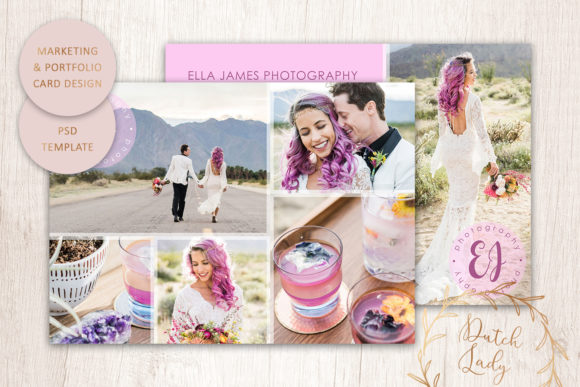
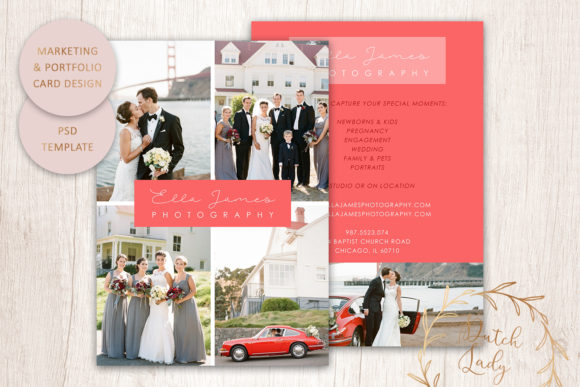
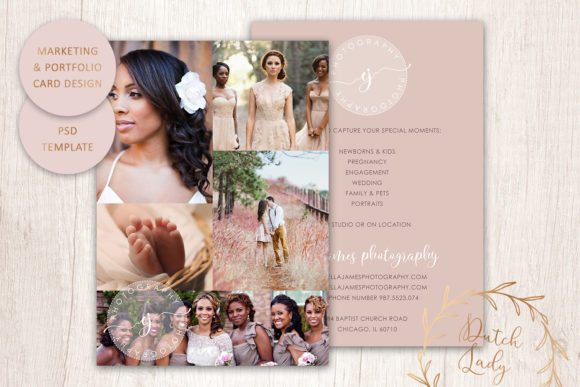
Photo Portfolio Card Template 1 is a digital design template created specifically for showcasing photographic work. It comes in the form of a high-resolution 300 dpi layered Photoshop .PSD file, which allows users to easily customize every element of the design. This template is ideal for those looking to create a professional-looking front and back postcard-style portfolio that can be used for networking, client presentations, or even as part of a larger marketing strategy.
Key Features of the Template
- High Resolution (300 DPI): The template is designed for print use with a resolution of 300 dpi, ensuring that the final output looks sharp and clear when printed.
- Layered Photoshop .PSD File: The design is built using layers, making it easy to edit individual elements such as text, colors, and images without affecting other parts of the layout.
- US Standard Postcard Size (7 x 5 Inches): The template is sized to fit standard US postcard dimensions, making it convenient for printing and mailing.
- Customizable Text Color, Size, and Position: You have full control over the text elements, allowing you to tailor the design to match your branding or personal style.
- Font Files Included: All fonts used in the template are included, so you don’t have to worry about missing or embedded fonts when editing or exporting the design.
- Customizable Colors: Every aspect of the template—backgrounds, borders, illustrations, and more—can be customized to suit your preferences or brand identity.
- Circle-Shaped Logo Included: A pre-designed circle-shaped logo is included, which can be easily modified or replaced depending on your needs.
- Bleed and Trimming Space: The template includes sufficient bleed and trimming space, ensuring that your design prints correctly and professionally at a print shop.
Why Choose This Template Over Others?
While there are many photo portfolio templates available online, Photo Portfolio Card Template 1 stands out due to its combination of quality, flexibility, and ease of use. Here’s why it’s a great choice for creatives:
1. Professional-Quality Design
The template is built with professional standards in mind. With a resolution of 300 dpi and proper bleed areas, it ensures that your final print will look polished and high-quality. This level of detail is crucial for making a strong impression on clients or employers.
2. Full Customization Options
One of the biggest advantages of this template is the ability to customize every element. From changing the background color to adjusting the position of text, you have complete control over the final look of your portfolio card. This makes it suitable for both beginners and experienced designers who want to maintain consistency with their brand identity.
3. Easy to Use
Despite its professional appearance, the template is user-friendly. The layered structure of the .PSD file allows for straightforward edits without the need for advanced Photoshop skills. Additionally, the inclusion of font files means you won’t have to search for replacements or worry about licensing issues.
4. Versatile for Different Uses
This template is not limited to just one use case. It can be used for a variety of purposes, including:
- Client portfolios
- Networking events
- Marketing campaigns
- Personal branding
- Online galleries
Whether you’re looking to present your work at a local gallery or send out promotional materials, this template offers the versatility needed to adapt to different scenarios.
How to Use the Template
Using Photo Portfolio Card Template 1 is a straightforward process. Here’s a step-by-step guide to help you get started:
Step 1: Open the Template in Photoshop
Launch Adobe Photoshop and open the provided .PSD file. You’ll see a layered design with all elements clearly separated, making it easy to edit individual components.
Step 2: Customize the Design
Use the Layers panel to modify the background, borders, and illustrations. You can also change the text color, size, and position to match your preferences. Don’t forget to replace the default logo with your own if desired.
Step 3: Prepare for Printing
Before sending the file to a print shop, ensure that the template has been properly adjusted for print. Check that all text is within the safe area and that the bleed areas are correctly set up. If you're unsure, consult with a professional printer for guidance.
Step 4: Print Your Portfolio Card
Once your design is ready, you can either print it yourself or take it to a local or online print shop. Remember that the template is not compatible with Photoshop Elements, so you’ll need to use the full version of Photoshop to ensure optimal results.
Common Misconceptions About Portfolio Cards
There are several misconceptions about portfolio cards that can lead to confusion. One common belief is that they are outdated or unnecessary in the digital age. However, physical portfolio cards still play an important role in creative industries. They provide a tangible, memorable way to showcase your work and can leave a lasting impression on potential clients or employers.
Another misconception is that creating a portfolio card requires advanced design skills. While some templates may seem complex, many, like Photo Portfolio Card Template 1, are designed to be user-friendly and accessible to people of all skill levels. With the right tools and guidance, anyone can create a professional-looking portfolio card.
Conclusion
Photo Portfolio Card Template 1 is an excellent resource for creatives looking to enhance their professional presence. Its high-resolution quality, customization options, and ease of use make it a versatile tool for showcasing photographic work. Whether you're a beginner or an experienced designer, this template provides the flexibility and quality needed to create a standout portfolio card that reflects your unique style and expertise.
By understanding the features and benefits of this template, you can make informed decisions about how to best utilize it in your creative workflow. As the design industry continues to evolve, having a strong visual identity remains more important than ever. With the right tools, like Photo Portfolio Card Template 1, you can take your portfolio to the next level and make a lasting impression on your audience.