Creating Professional Instagram Templates with Logo and Mascot Elements
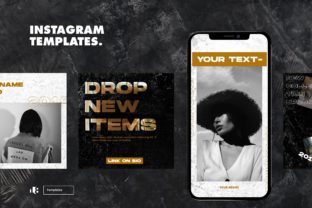
Designing for social media platforms like Instagram requires more than just aesthetic appeal—it demands a strategic approach to content creation. One of the most effective ways to maintain brand consistency across posts is by using Instagram templates that incorporate key visual elements such as logos, mascots, and text layers. These templates not only streamline the design process but also help in creating a cohesive brand identity that resonates with your audience.
The Role of Logo Templates in Brand Identity
A logo is often the first thing people notice about a brand. It serves as a visual anchor that helps reinforce brand recognition. When designing an Instagram template, integrating a logo template ensures that your brand’s identity remains consistent across all posts. This is especially important for businesses that rely heavily on their visual presence to build trust and familiarity with their audience.
Logo templates can be created in various formats, including PSD (Photoshop Document) and AI (Adobe Illustrator) files. These formats offer flexibility in terms of editing and scalability. PSD files are ideal for those who prefer working within Photoshop, allowing for detailed layer management. On the other hand, AI files are vector-based, making them perfect for maintaining sharp visuals at any size.
When selecting a logo template, it's essential to consider how it will interact with other design elements. A well-designed logo should complement the rest of the template without overpowering it. This balance is crucial for creating visually appealing Instagram posts that align with your brand’s overall aesthetic.
Incorporating Separated Layer Mascots
Mascots have become a popular tool for brands looking to create a more personal and engaging connection with their audience. Whether it's a cartoon character or a stylized icon, a mascot can serve as a memorable representation of your brand. When designing an Instagram template, incorporating a separated layer mascot allows for greater control over its placement and integration within the design.
Separated layer mascots are typically designed with individual elements such as the body, limbs, and facial features. This modular approach makes it easier to adjust the mascot’s position, scale, or color without affecting the rest of the design. For example, if you want to highlight a specific part of the mascot, you can easily isolate that layer and bring it to the foreground.
Using a separated layer mascot also offers practical benefits in terms of workflow efficiency. Designers can work on different elements of the template independently, which is particularly useful when collaborating with multiple team members or when making last-minute changes before posting.
Text Layers and Their Importance in Design
Text is a critical component of any Instagram post, whether it's used for captions, headlines, or call-to-action statements. When designing an Instagram template, it's important to plan where and how text will be placed. This includes considering factors such as readability, contrast, and alignment with other design elements.
One effective way to manage text layers is by separating them from other design elements. This allows for greater flexibility in adjusting the text’s font, size, and position. For instance, if you want to change the font style of your headline, you can do so without affecting the layout of the rest of the template.
Choosing the right font is another key consideration. Many designers use font link files to access high-quality fonts that enhance the visual appeal of their designs. These fonts can be downloaded and used directly within design software like Photoshop or Illustrator. It’s important to select fonts that are both readable and visually appealing, ensuring that your text stands out while maintaining a professional look.
Previewing Your Design Before Finalizing
Before finalizing an Instagram template, it’s essential to preview your design to ensure that all elements work together harmoniously. Previewing allows you to see how your logo, mascot, text, and other design components appear in a real-world context, such as on a mobile device or a desktop screen.
Many design tools offer built-in preview functions that simulate how your template will look once posted. This feature is invaluable for catching any potential issues, such as overlapping elements or poor contrast between text and background. By previewing your design early in the process, you can make necessary adjustments and avoid costly mistakes down the line.
Additionally, previewing your design helps in identifying any inconsistencies in branding. For example, if your logo appears too small or your mascot is misaligned, these issues can be corrected before the final version is shared with your audience.
Practical Benefits of Using Design Files
Working with PSD and AI files provides several practical benefits for designers. These file formats allow for non-destructive editing, meaning that you can make changes without altering the original design. This is particularly useful when making minor adjustments or experimenting with different layouts.
Furthermore, these file types support layered compositions, making it easier to organize and manage different design elements. For example, you can keep your logo on one layer, your mascot on another, and your text on a separate layer. This organization not only streamlines the design process but also makes it easier to collaborate with others or share your work with clients.
For businesses that frequently update their social media content, having access to editable design files can significantly improve workflow efficiency. Instead of starting from scratch each time, designers can simply make adjustments to existing templates, saving time and effort in the long run.
Best Practices for Creating Effective Instagram Templates
Creating an effective Instagram template involves more than just combining visual elements—it requires careful planning and attention to detail. Here are some best practices to follow:
- Keep it simple: Avoid cluttering your design with too many elements. A clean and minimalist layout tends to be more visually appealing and easier to read.
- Ensure consistency: Maintain a consistent color scheme, typography, and layout across all your templates to reinforce brand identity.
- Optimize for mobile: Since most users access Instagram via mobile devices, ensure that your template looks great on smaller screens.
- Use high-quality assets: Always use high-resolution images and graphics to maintain the quality of your design.
- Test different variations: Experiment with different layouts and color schemes to find what works best for your brand and audience.
By following these best practices, you can create Instagram templates that not only look great but also effectively communicate your brand’s message to your audience.